Deploy Windows devices, distribute software and control patching — with asset management (ITAM) and service management (ITSM) from a single provider. highsystem connects these tasks for IT teams that want to manage their devices and processes together. As a highsystem | CLOUD service from Switzerland or with highsystem | NET in your own infrastructure.
When software deployment, patches and fresh installations shape your daily IT work, you need a solution that connects these tasks with your device inventory and support. This is where highsystem excels: your IT team manages Windows devices and uses the associated inventory, contract and support information within the same solution portfolio.
Deploy your own business applications, define installation groups and schedules, and give employees access to software through a kiosk. With highsystem | CLOUD as a service or highsystem | NET on your infrastructure you also choose the deployment model that suits your organisation. Client management, asset management (ITAM) and helpdesk come from one manufacturer, with personal contact in Switzerland.
Keep the Microsoft services you need
highsystem takes over the Windows management tasks you want to replace. Microsoft Entra ID, Conditional Access, Microsoft 365 and Intune app protection retain their respective roles. Modernise your client management while continuing to use the identity, security and mobile device functions you need.
Three approaches — depending on where you start
There are three approaches to an Intune alternative: change platforms, specialise in Windows management or complement existing functionality. highsystem brings Windows client management, ITAM and helpdesk together.
Switch management platforms
Another endpoint management platform takes over the required tasks. This approach suits organisations that want to rethink operating systems, enrolment, app protection and security requirements together. Compare UEM providers against these requirements and define which Windows tasks highsystem will handle in your target architecture.
Specialise your Windows management
You want to bring installations, business applications, patches and inventory together consistently. highsystem provides client management with a software kiosk, package service and connections to ITAM and helpdesk. Compare this approach with other client management solutions or an expansion of your Microsoft architecture.
Extend your existing Intune environment
Intune stays in place, while you add functionality where your team needs more support. Microsoft add-ons and specialist providers can meet these needs. highsystem connects additional Windows deployment tasks with inventory, asset management (ITAM) and service management (ITSM).
Intune and highsystem: features compared
highsystem's advantage lies in how everything works together: roll out software, keep your device inventory current and access the same object information in support. Compare how the two solutions support your day-to-day work.
Comparison by task · Updated 22 September 2026 · Scroll horizontally on small screens.
Task
Microsoft Intune
highsystem
Software Deployment
Deploys Win32 applications with requirements, detection rules and dependencies. Custom packages are prepared for Intune and installed through the Management Extension.Microsoft: Win32 app management
Deploys original installers using parameters, MST transforms or batch processing. Control installation groups and schedules and give employees a software kiosk. The package service reduces your team's packaging workload.highsystem: Software Deployment
Patch Management
Controls Windows updates through rings and policies. Third-party apps can be maintained using updated packages or Enterprise App Management. Auto-updates are also available there for catalogue apps with a required assignment.Update rings · App catalogue
Takes patches from testing and administrator approval through to scheduled rollout to your device groups. You stay in control of approval; highsystem monitors installation success and updates the inventory.highsystem: Patch Management
Inventory
Collects device and software data. Windows supports a configurable Properties Catalog and enhanced app inventory; collection methods and requirements vary by feature.Device properties · App inventory
Records hardware, software versions and installation history. With ITAM and helpdesk, you can also use this data for commercial tasks and support cases – from the technical inventory to the responsible contact.highsystem: IT Inventory
Remote Support
Remote Help provides remote assistance with Entra sign-in and role-based permissions. The relevant add-on or suite entitlement is required and may be included in the Microsoft 365 package. Features depend on the platform and scenario.Microsoft: Remote Help
Start screen viewing and remote control directly from the management console. User confirmation and logging provide a traceable support process while your team helps on the affected device.highsystem: Remote Control
OS deployment
Windows Autopilot typically configures an existing Windows installation. A fresh installation using a custom image is a different approach; Microsoft's Autopilot scenario for existing devices uses Configuration Manager for this.Autopilot · Existing devices
Deploys Windows, drivers and software through unattended installations. Organise fresh installations and recurring rollouts centrally, then continue managing the devices in the same environment.highsystem: OS Deployment
Asset Management (ITAM)
Provides technical device data. For commercial processes, establish which system manages procurement, use, licences and contracts, and connects them with this data.
Connects technical inventory with asset classes, custom fields, documents, contracts and responsibilities. Device management and commercial decisions draw on the same information.highsystem: Asset Management (ITAM)
Service Management (ITSM)
Can connect to an ITSM platform. Microsoft offers a ServiceNow integration with associated incidents, for example, subject to its own requirements.Microsoft: ServiceNow integration
Connects tickets, workflows and knowledge articles with your IT objects. Your team handles support cases directly in the context of the device. Use ITIL as a guide and implement the right processes with the highsystem Helpdesk.highsystem: Helpdesk and ITSM
Choose the highsystem modules that suit your IT. Our comparison takes account of your devices, deployment option and existing Microsoft licences, giving you a clearly defined scope for your requirements.
Replace or combine? Two practical scenarios
Move Windows management tasks to highsystem
Your IT team wants to manage packaging, software deployment, patches and fresh installations through highsystem. Other Microsoft services can remain in place.
highsystem takes care of
The Windows tasks validated in the pilot, the associated inventory and, where needed, ITAM or helpdesk.
Microsoft remains responsible for
For example, for identities, Microsoft 365 and mobile management or protection functions that are still required.
Requirements for the switch
Packages, target groups, permissions and rollback procedures have been tested. Only then are the corresponding Intune assignments retired in a controlled way.
Keep Intune and extend it selectively
Intune remains responsible for enrolment, compliance and selected policies. highsystem addresses a clearly defined additional requirement.
Intune takes care of
The device and security tasks you have chosen to retain, plus the agreed app assignments.
highsystem adds
For example, additional Windows deployment tasks or inventory data for asset management (ITAM) and helpdesk.
Requirements for the combination
One system takes the lead for each application, update channel and policy. The agent, data migration and conflict handling are tested on real devices.
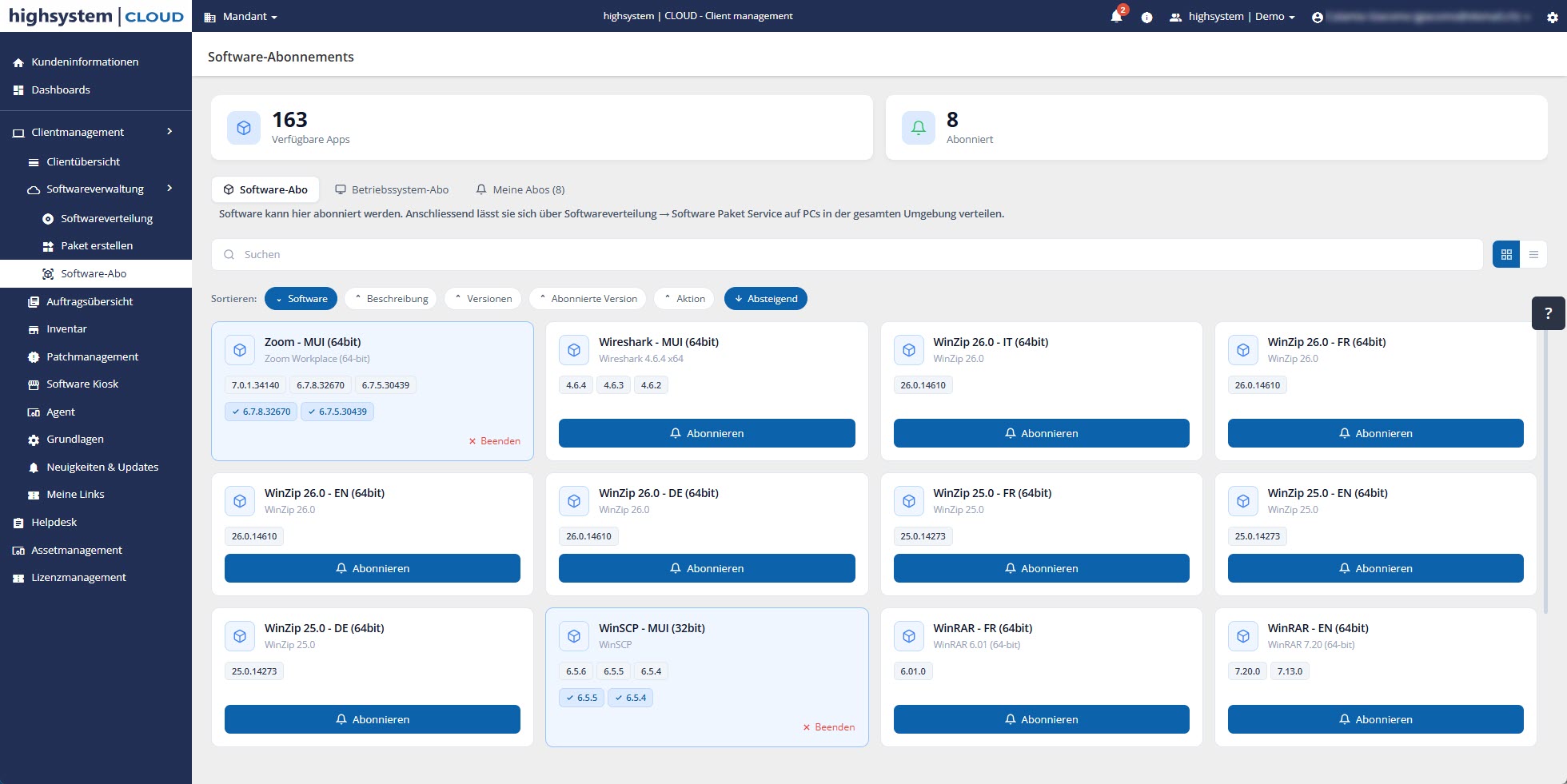
highsystem gives you visibility from software package to installed device: choose a version, test it in your environment, approve the rollout and check the result. The highsystem | CLOUD interface shows the starting point through software subscriptions.
Software subscriptions in highsystem | CLOUD: select a package and version, then assign it through software deployment. The versions shown are examples. Click the image to enlarge it.
Select and prepare a version
Select the package and version you need. In highsystem | CLOUD, software subscriptions provide this capability. Define which devices should receive the software.
Test in your own environment
Test the package on selected devices. Include installation, application launch, user permissions and a restart where necessary. The package service provides prepared packages for you to test and approve in your own environment.
Approve and roll out
You define the device groups and timing. Once you approve, highsystem handles the scheduled deployment. Patch management follows a controlled path from test PCs to approved target groups.
Check results and inventory
Check installation results and outstanding jobs. highsystem updates inventory data after installation; the software version and installation history remain available for ongoing management.
Alupak AG reports faster deployment of devices and software after introducing highsystem | NET. The software kiosk, which lets employees install applications themselves, is particularly valued. Read the Alupak AG success story (PDF, new tab).
Use measurable acceptance criteria for your pilot: successful installations by target group, failed attempts, manual interventions and time to a confirmed target version. Agree the baseline, test devices and measurement period in advance.
What you need to get started
Together with highsystem, you plan implementation around your devices, applications and operational requirements. A pilot using representative devices and software packages provides the foundation for a phased rollout.
highsystem | CLOUD: Platform as a service
Access the interface in your browser; managed devices require the designated agent. highsystem operates the platform in Switzerland. Your IT team retains responsibility for devices, software approvals, permissions and agreed processes.
highsystem | NET: Operated in your infrastructure
You provide the required server environment and software licences. Security, updates and backups of your installation form part of your operating plan. Sizing, supported databases and connections are confirmed for the relevant version.
Assess your estate and dependencies
Document Windows versions, locations, off-site devices, business applications, package formats and required restarts. Record where Entra ID, Active Directory, Conditional Access, Microsoft 365 or Intune app protection will still be needed.
Define components and responsibilities
Clarify agent deployment, network paths, firewall and proxy requirements, package storage, data migration and operational roles. Confirm the current system requirements and licensed module scope.
Approve the pilot, then migrate gradually
Test representative devices and demanding packages. Define success criteria, escalation paths and rollback procedures. Only then migrate groups and retire overlapping assignments in a controlled way.
Windows and application licences remain necessary. Existing Microsoft services may also continue to require licences. Existing Intune policies and packages cannot automatically be transferred without changes.
Frequently asked questions about Intune alternatives
Can highsystem replace Microsoft Intune completely?
highsystem handles core Windows tasks such as software deployment, patch management, inventory and OS deployment, connecting them with ITAM and helpdesk. We assess your requirements to determine whether to replace Intune entirely or retain it for mobile devices, app protection and compliance. Entra ID and Microsoft 365 remain separate services.
Can I run Intune and highsystem side by side?
We plan a combination with clear responsibilities: for example, Intune for compliance and selected policies, and highsystem for additional Windows deployment tasks, ITAM and helpdesk. We designate one leading system for each application, update channel and policy, then test how they work together in the pilot.
How do the costs of highsystem and Intune compare?
highsystem provides a quotation for the modules you need and your chosen deployment option. For a meaningful comparison, we consider device numbers, existing Microsoft licences, package maintenance, support and operational effort together. This shows you which scope fits your budget and requirements.
Is Windows Autopilot the same as OS deployment?
Not in every scenario. Autopilot typically configures Windows that is already installed. A fresh installation with drivers, your own installation sources or an image has different prerequisites. Test the deployment method your devices actually need.
How do other operating systems and mobile devices fit in?
This page focuses on Windows management. For your other devices, we plan the appropriate tasks by operating system: enrolment, app deployment, data protection and security policies. Our overview of UEM, EMM and MDM shows how to consider Windows client management and mobile requirements together.
Further information
As of 22 September 2026. Details of features and prerequisites are available in the linked product information.
We demonstrate software deployment, patch management and the path from device to support case using your own tasks. Together, we plan which Intune tasks you want to replace or complement.